DOWNLOADING TXL IS NOT REQUIRED IF Colin McRAE: DiRT 2 GAME WAS OBTAINED FROM THE “HOW TO PLAY” PAGE! – HERE
Download – Unzip – Place all files in the game directory
(Same location as Dirt2.exe): Password = DiRTCENTER
Use included JSGME.exe to enable / disable TXL as you please
Must be on a Private Network or Virtual Private Network (VPN) for Teknogods Helper to work properly…
1) Install Radmin VPN – Download
2) Run Radmin VPN [Join Network > Gaming Networks > Dirt 2]
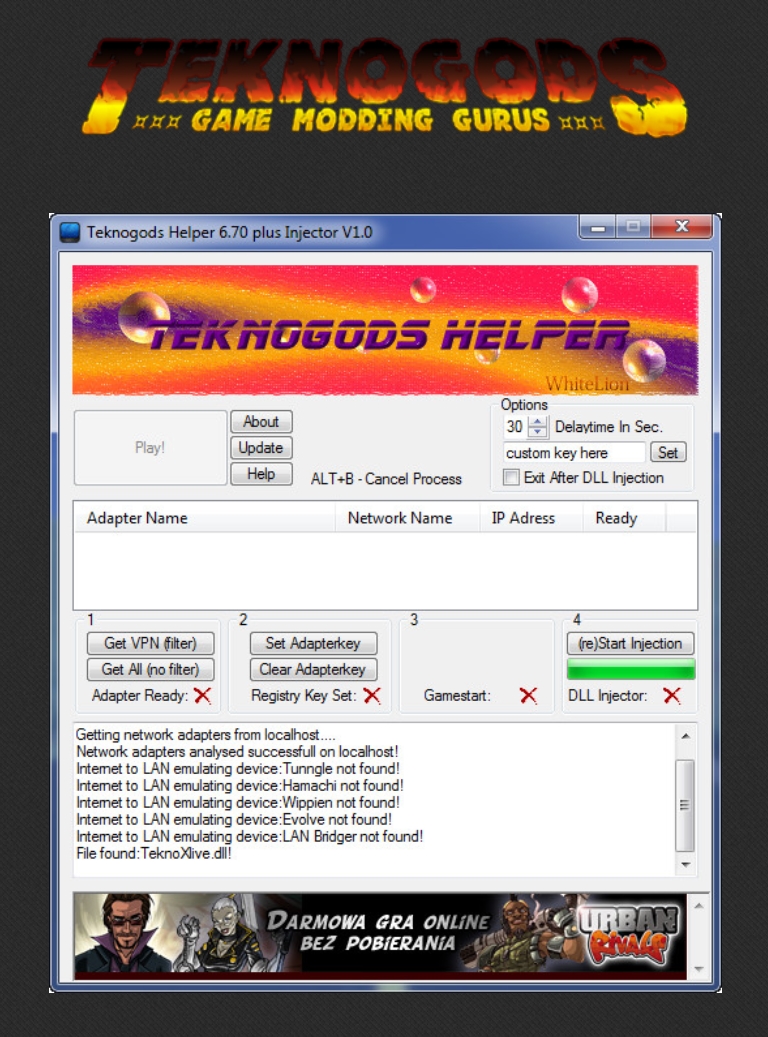
3) Run TeknoHelper.exe
4) Select [Get All (no filter) > Radmin > Set AdapterKey]
5) Choose (Re)start Injection.
6) Run DiRT2
7) You may need to Set AdapterKey again once injection is done
8) In-game select [Multiplayer > Local Connection] to play online
Note: Always clear the AdapterKey and restart your game to avoid issues when trying to connect using Games For Windows Live, XLiveLessNess, ect.
Note: If stuck on “Connecting” in Radmin, you may need to change DNS setting to be compatible. Example: 1.1.1.1 and 1.0.0.1
Credit – Kulibob CZ : Information posted in DiRT 2 Discord server.